Live Ride Get the app

The bike computer already in your pocket.

Live Ride records every ride with clean GPS data, plans routes with turn-by-turn cues, and now keeps track of your chain, tyres and brake pads too.

Free for your first 10 rides. After that, one optional purchase. Never a subscription.

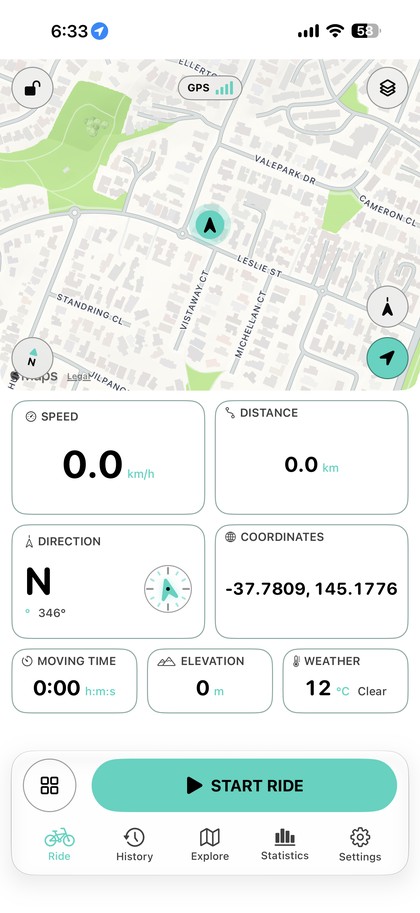
Live Ride ride screen with a live map, GPS status, speed, distance, heading, elevation and weather tiles.

Fresh off the workstand.

The biggest update yet: maintenance tracking for every bike, your ride on the Lock Screen, a Home Screen widget and hands-free control.

Pro

Bike maintenance that keeps count for you

Add your bikes and Live Ride logs distance against each part. When a chain, set of tyres or brake pads is due, you'll hear about it after the ride, not halfway up a climb. One swipe marks it serviced.

Chain3,040 / 3,000 km
Brake pads1,860 / 2,000 km
Tyres2,210 / 5,000 km
Chain due for serviceRoad bike · 3,040 of 3,000 km
Live Activity

Your numbers on the Lock Screen

Speed, distance and moving time stay on the Lock Screen and in the Dynamic Island while you record. Pause and resume without unlocking.

7:42
● RecordingLive Ride
31.2km/h
24.80km
52:18moving
Widget

Weekly goal on your Home Screen

64%

64.2 of 100 km this week, plus your latest ride, at a glance.

Siri & Action Button

Start without touching the screen

Start a ride in Live Ride

Start, pause and resume by voice, from Shortcuts, or with the Action Button. Handy with gloves on.

Personal bests

Know when you've beaten it

112.4km98.7

Finish a ride with a new longest distance, top speed or most climbing and Live Ride tells you on the spot.

What you'll actually see.

Straight from the app, no mockups.

Ride screen with a live map, speed, distance, heading, moving time, elevation and weather.
RideMap and live metrics on one screen.
Route planner with round trip and one way options, a target distance and road preferences.
PlanRound trips or one-way, built to a distance.
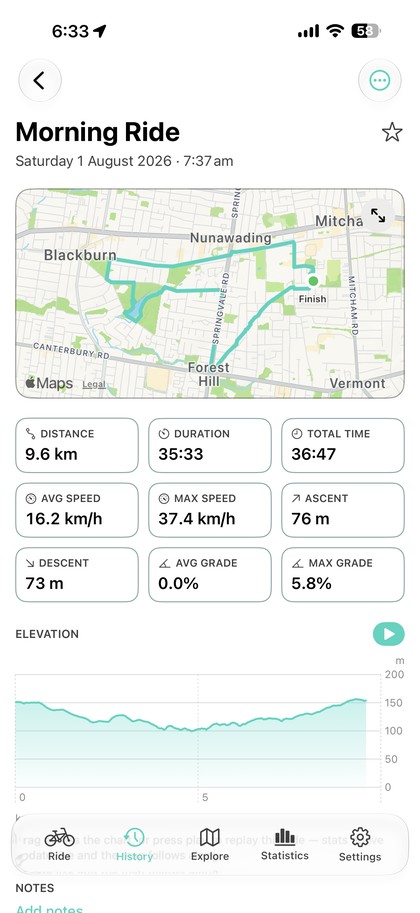
Ride detail screen with the route map, distance, duration, speed and elevation profile.
ReviewRoute, totals and an elevation profile.
Statistics screen with weekly totals, a weekly goal and personal records.
ProgressGoals, totals and records.
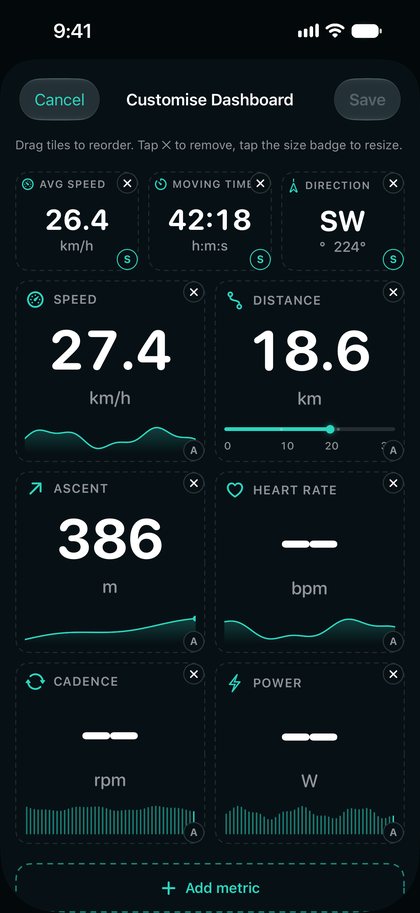
Dashboard editor with metric tiles that can be added, resized and reordered.
CustomisePick, resize and reorder every tile.
Appearance settings with accent colour presets, a custom colour picker and contrast options.
StyleYour colour, right down to the app icon.

Scroll sideways →

Everything in the box.

A full cycling GPS app, built natively for iPhone. Here's the complete list.

Recording

Filtered GPS
Jumps, bad fixes and stale points are dropped before they reach your distance.
Smoothed speed, elevation and grade
Numbers that read steadily instead of jittering.
Auto-pause
Stops the clock at lights and cafés. Sensitivity is adjustable.
Background recording
Lock the phone or switch apps; the ride keeps going.
Battery-saving display
Dims the dashboard while you're moving, with a heads-up if you start low on charge.
Crash recovery
If the app is closed mid-ride, the ride is saved for you.

Dashboard

20+ live metrics
Speed, pace, distance, times, elevation, ascent, grade, heading, weather, calories and more.
Your layout
Small, medium or large tiles, three map sizes, drag to reorder.
Presets
Separate layouts for road, climbing or exploring. Switch in one tap, even mid-ride.
Audio updates
Spoken distance, time and speed at the interval you choose.

Routes

Route planner
Round trip or one way from any address, to a target distance, avoiding highways and tolls.
Turn-by-turn cues
On-map turn banners with optional spoken directions.
GPX import
Bring routes in from anywhere and follow them on the live map.

History & stats

Ride detail
Route map, full stats, an elevation profile and a ride replay.
Statistics & records
Totals by week, month, year or all time, plus personal bests.
Weekly goals
Distance, time, climbing or ride count, shown in the app and on your Home Screen.
Share
A clean summary image of any ride.

Your data

GPX export
Any ride, as a standard GPX file.
Full backup
Rides, routes, bikes and settings in one file you keep. Restore any time.
Apple Health
Optional. Save rides as workouts and import heart rate from your watch.

Make it yours

Accent colours
Ten presets or any colour you like, matched by the app icon if you want.
Light, dark, high contrast
High contrast is built for bright sunlight.
Metric or imperial
Switch at any time; every number reformats.

Pay once, or not at all.

No account to make and nothing that renews.

Free
10 rides
  • Every recording, dashboard and route feature
  • Live Activity, widget and Siri shortcuts
  • Your history stays yours, always
Live Ride Pro
One-time
  • Unlimited rides
  • Bike maintenance tracking for every bike
  • Bought once through the App Store, yours to keep

Pro is a single, non-renewing App Store purchase. Rides you've already recorded are never locked. Purchase terms.

Your rides stay on your phone.

Live Ride doesn't have a server, so there's nowhere for your data to go unless you send it.

No account

No email, password or profile. Open the app and ride.

On-device

Rides, routes and bikes are stored locally on your iPhone.

No trackers

No analytics or advertising SDKs of any kind.

Your call

Health sync is off by default. Sharing only happens when you tap share.

Read the privacy policy

Questions, answered.

Do I need an account to use Live Ride?
No. There is no sign-up, login or profile. Install the app and start riding.
Is Live Ride a subscription?
No. Your first 10 rides are free. Live Ride Pro is a single one-time purchase through the App Store that unlocks unlimited rides and bike maintenance tracking. It never renews.
How does bike maintenance tracking work?
Add your bikes and choose which one you're riding. Live Ride counts the distance on each part, such as the chain, tyres and brake pads, and lets you know after a ride when one is due. Marking a part as serviced resets its count. It's part of Live Ride Pro.
Can I see my ride on the Lock Screen?
Yes. While you record, speed, distance and moving time appear on the Lock Screen and in the Dynamic Island, with a button to pause or resume.
Can I start a ride with Siri or the Action Button?
Yes. Say "Start a ride in Live Ride", or assign Start Ride to the Action Button in Settings. Pause and resume work the same way.
Does Live Ride work offline?
Recording, GPS and the dashboard work without a connection. Map imagery and weather need a signal to load, but your ride keeps recording regardless.
Is my ride data private?
Yes. Rides, routes and bikes are stored on your iPhone. Live Ride has no server to send them to and contains no analytics or advertising SDKs. See the privacy policy.
Which devices does Live Ride support?
iPhone and iPad running iOS 17 or later.
Finish line

Clip in.
Press start.

Free to download. Your first 10 rides are on us.

Download on the App Store